
How to move your SAP data warehouse to the cloud
SAP Datasphere, SAP BW Bridge
Cloud-based systems are becoming increasingly popular due to their great flexibility and growing efficiency. The new data warehouse from SAP – Datasphere, which replaces SAP BW, tempts with its capabilities, but raises some questions. Does the move to the cloud involve implementing the entire solution from scratch? Do all elements of the existing system have to be manually processed and adjusted in the new environment? Absolutely not. A tool enabling a smooth transition from on-premise SAP BW to a cloud-based warehouse is BW Bridge.
We outline how to safely migrate data to S/4, what scenario to choose and what tools to use to reduce the amount of data.
Let’s look at different migration scenarios with a focus on data migration.
Greenfi
Flexibility and efficiency that ensure fast data processing are not the only advantages of cloud solutions. IT department employees do not have to worry about additional hardware resources if the amount of stored and processed data increases, and they do not need to take care of regular system updates. Easy expansion of available space and regular upgrades of the environment are guaranteed by the cloud provider. In addition, cloud-based systems feature a user-friendly interface.
Moving an existing on-premise data warehouse to the cloud – just like migrating ERP or HR process handling systems – is becoming one of the items on the list of the company’s plans of developing business systems.
Many entities have an extensive and fully functional SAP BW data warehouse. Over the years, organizations have developed their on-premise system, adjusting it to the needs of business users. They increased the number of supported sources, flows of data or reports, which often have a high level of complexity. It is difficult to abandon such a convenient and well-tailored solution, even if the expected benefits are high.
Aware of these concerns, SAP, the system manufacturer, has added BW Bridge to SAP Datasphere, its cloud-based data warehouse. This is an extension of the SAP Datasphere cloud data warehouse functionality. It allows companies with SAP BW or SAP BW/4HANA to access the public cloud. The tool provides:
- Continuity of investment – through reuse of SAP BW data structures, transformations and adjustments in the cloud;
- Integration with SAP ERP data – thanks to the connectivity and semantic flexibility of SAP Business Warehouse;
- Benefiting from the flexibility and innovation of a cloud solution.
Why SAP Datasphere?
Today, no one needs to be convinced of the advantages of a cloud-based solution. What else makes SAP Datasphere worth considering as a target data warehouse system? We list the most important reasons below:
- It is the only SAP data warehouse currently under development;
- High flexibility – resulting from both using the cloud as a basis, and extensive modeling capabilities;
- Friendly, graphical interface;
- Enabling consultants or administrators as well as business users to create data flows (in the case of SAP Datasphere, it is assumed that business users are able to perform 70% of activities related to data flow modeling and administering);
- Integration with SAP Analytics Cloud – including support for scheduling in SAC;
- Ability to report from MS Excel;
- Source systems: on-premise, cloud and files;
- Supporting remote data access so that data on the SAP Datasphere side is always up-to-date;
- Unlimited technical support for the time being (SAP BW 7.5 is supported until 2027, while BW/4HANA is supported until 2040);
- BW Bridge option enabling the use of the currently existing SAP BW or SAP BW/4HANA solution.
The above-mentioned features of SAP Datasphere indicate that it is worth considering the migration of the on-premise SAP BW data warehouse solution to the cloud. In the following parts of the article, we will focus on the capabilities of SAP BW Bridge that make it easier to take action in this area.
BW Bridge – conversion of SAP BW objects
The use of SAP BW objects in SAP Datasphere is based on the configuration of the solution in two tools. These are:
- BW modeling tools in Eclipse – this part is related to modeling infoproviders and extracting data from the source system;
- SAP Datasphere, BW Bridge – this side is used for user and role management, as well as administration, which includes defining and monitoring process chains or managing the content of infoproviders.
The architecture of the solution using SAP BW Bridge is presented in the diagram.
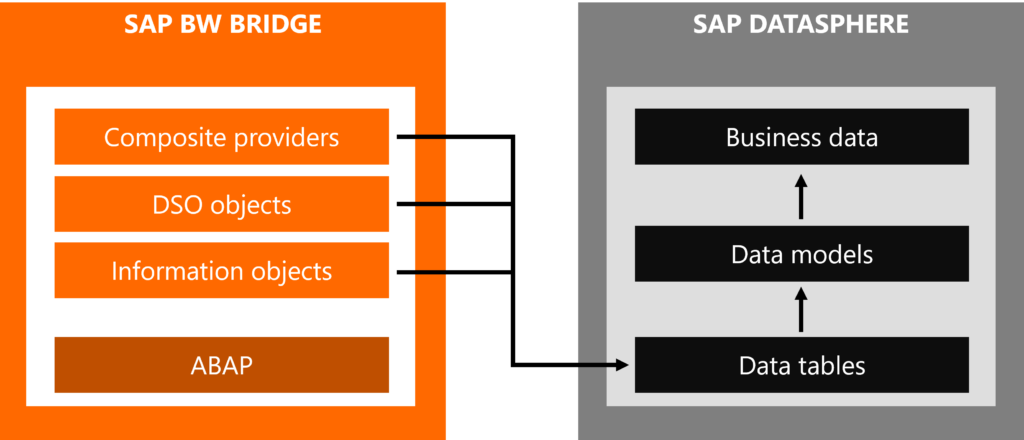
Conversion of SAP BW objects to SAP Datasphere using SAP BW Bridge
In order to make DSO objects (advanced type), composite providers or master data (texts and attributes) from SAP BW visible in SAP Datasphere, a dedicated BW Bridge space is created on the cloud solution side. The listed objects in SAP Datasphere are visible there as remote tables. The main and only purpose of the BW Bridge space is to import and share the mentioned remote tables to other spaces where data is modeled already on the basis of SAP Datasphere objects.
At this point, it is worth noting that not all objects are automatically converted to SAP Datasphere objects.
In particular, manual customization is required by:
- Business Explorer objects (including queries);
- Some source systems – BW Bridge only supports ODP systems (SAP, BW, CDS, SLT). Other data sources should be configured directly from SAP Datasphere;
- Planning – has been moved entirely to SAP Analytics Cloud;
- Consolidation in BPC – SAP currently recommends group reporting available in S/4HANA for data consolidation;
- APD (Analysis Process Designer) processes.
BW Bridge conversion types and limitations
Conversion of an existing data warehouse solution to SAP Datasphere using BW Bridge is possible for SAP BW systems, version 7.3 or higher based on any database and SAP BW/4HANA. In each case, the system should have the most up-to-date package installed. Older systems (<7.3) must be upgraded before conversion.
Two types of conversion are available: shell and remote.
Features of shell conversion:
- Conversion of selected database data models;
- Support for carve-outs and system consolidation;
- Acceleration of deployment from scratch by uploading and converting data models and flows.
Features of remote conversion:
- Conversion of selected database data models;
- Support for carve-outs and system consolidation;
- Transfer of data models and remote data access;
- Risk reduction thanks to the parallel system.
Currently, the maximum data capacity for BW Bridge is 4096 GB. This means that the solution is suitable for small and medium-sized enterprises or selected models for large data warehouses. Additionally, when using SAP BW Bridge, the following aspects must be taken into account:
- Application development should be done using SAP BTP on the SAP HANA platform;
- OLAP functionalities, including in particular data access, are not supported;
- SAP HANA views generated based on infoproviders from SAP BW (BW/4HANA) are not available;
- Streaming process chains are not supported.
Despite the aforementioned limitations, it should be noted that the vast majority of objects created on the SAP BW or SAP BW/4HANA side are supported by BW Bridge, including in particular the infoproviders already mentioned, as well as their corresponding data flows. In addition, SAP provides a self-service toolkit for assessing the condition of an existing SAP BW 7.x or SAP BW/4HANA system as part of preparation for the transformation into SAP Datasphere.
Readiness Check for SAP Datasphere assesses the compatibility of the source system under analysis with SAP Datasphere, SAP BW Bridge and provides a comprehensive overview of various aspects required for analysis in the transformation process.
How about a hybrid?
Conversion of the original system is not all that SAP has to offer to users of the on-premise data warehouse system. For BW/4HANA users, a hybrid solution is also possible within the SAP BW/4HANA Model Transfer functionality. Its capabilities are constantly expanding. Unlike conversion, the undoubted advantage of this approach is the support for queries based on composite provider objects, as well as support for data access.
Thanks to the aforementioned possibilities of converting the current on-premise data warehouse solution, the operation of transition to the cloud does not involve implementing everything from scratch. The unquestionable advantages of the cloud solution as well as the SAP Datasphere data warehouse itself clearly indicate that it is worth it.
The first step in verifying whether the migration is reasonable and feasible should be to check the current system using the Readiness Check for SAP Datasphere program. It will simultaneously help assess the workload of the entire operation. We encourage you to take this step. It is quite possible that the number of necessary customizations or required workload will not turn out to be so large and will positively surprise you.
eld. In this approach – implementing the system from scratch – we start using new S/4 functions and technologies without access to historical data. The focus is on adapting the system to business processes. An additional data migration project (open items, opening balances) is required to be able to use backward analyses.
Brownfield. This is the opposite approach. We do not change business processes. I transfer all the history and all the data to the new system. Migration is in fact a technical upgrade of the system to a new version and a faster database.
Bluefield. This approach combines the best of both of the above ones. We move to a new version of the system, and at the same time we flexibly improve processes and can selectively migrate historical data. We can perform the migration quickly – during the weekend (we start on Friday evening, finish it on Saturday evening and hand over the finished system to the customer so that they can test it on Sunday and provide it to users on Monday). This time can be further shortened in the “near zero downtime” approach. The time needed for migration depends on the size of the system and the complexity of the project. It is worth noting that we are not dependent on the fiscal year, we can perform the migration at any time.
Slimming down the system – why and how
The reasons for selecting historical data may vary. They can be divided into two main categories.
In some circumstances it is necessary. For example, in the case of the sale of a business unit, when a system is carved out for another entity, however without master data (it is especially necessary to protect sensitive data, such as financial data, addresses, account numbers, etc.). Another reason is the size of the system. A large amount of data makes it necessary to plan the system downtime for the time of migration. Not every company can afford this, and then there are demands to get rid of unnecessary ballast and reduce the amount of transferred data.
The second category of reasons is the desire for optimization. Reducing the amount of data improves the efficiency of the system’s operation, thus speeding it up. Historical data is often unnecessary ballast that can be disposed of without harming the business. And finally – a smaller data volume makes it easier to implement other transformation scenarios in the same project as migration to S/4 (e.g., harmonization and consolidation of a chart of accounts or business partner).
In Bluefield, an in-house developed approach, we use the CrystalBridge platform offering a wide portfolio of tools that automate migration activities, including data migration.
Data migration in a typical S/4 migration project
The distinguishing feature of the Bluefield approach in migrating to S/4 is the creation of an empty copy of the system (without data), and then its conversion to S/4. This creates a golden copy of the system, ready to receive data. The next step is a test migration. It is followed by verification, user testing, patching and specification refinement. We perform several iterations of migration, testing and patching. This is a continuous process to catch all errors. Usually it has from 2 to 5 cycles, depending on the complexity of the project. The last cycle – a final rehearsal (to improve efficiency and draw up a detailed schedule) is followed by go-live.
In the analysis phase – even before accessing the customer’s system, we use System Scan, a tool that presents in an attractive visual form what the system contains, how individual data and processes are used.
CrystalBridge Transformation Cockpit allows us to select data based on the organizational structure or based on time.
The selection based on the organizational structure (for example, in FI – a company code, SD – a sales department, MM – a plant, CO – a controlling area) occurs in almost every type of an SAP transformation project. The second option – selection based on time (usually a fiscal year or a selected date) is possible for each SAP area, in a detailed (tabular) approach or in an aggregated (BAPI) approach.
What about the historical data?
And what happens to the old data? Several approaches are possible. Depending on the type of data and the customer’s decision, historical data can be archived 1:1 (we cooperate with a subcontractor that specializes in archiving transformations), we can store it in a data warehouse (in BW we can transform data with tools available in BW standard or use solutions provided by our company). Old data can also be simply deleted.
Automated tests
Automated tests are one of the tools that, after selective data migration, allows us to check whether we have actually packed into the target system the data that is needed for the proper operation of business processes. They can also help us check the configuration. The key advantages of automated tests are:
- They are independent of the user interface;
- They contain predefined test scenarios;
- They allow for flexible selection of the scope of the tested data;
- They enable the test log to be tracked;
- The preparation of customer-specific test objects does not require much effort;
- They do not require additional equipment.
Another tool is Data Consistency Verification. It is used to check connections between individual tables and fields and to verify data integrity. The solution provides:
- Technical verification of data integrity of the entire system;
- Fully automatic control;
- Only the evaluation of identified inconsistencies and their inclusion in the implementation must be done manually by the user;
- Three types of verification: foreign keys, domain values and fixed domain values.
And finally, good advice. After moving to a new place, it’s a good idea to keep master data organized. SAP offers a dedicated tool to maintain data integrity – Master Data Governance. All for One also offers its customers support in this area.
Case study #1: Automotive industry
Selective data migration
Already in the source system, the customer had a fairly clean division of the system by organizational unit. The business was clearly divided into two areas: cars and trucks. For finance, it was a division by company code, for sales – a sales department, for controlling – a controlling area, and for purchasing – a plant. Only the purchasing department was problematic. We handled it in such a way that we did not delete all the data upon agreement with the customer. The project was unusual in that the customer decided to duplicate their system (clone and delete), i.e. make a copy of the client and then delete unnecessary data from each system separately. This approach allowed the customer to work on both systems in parallel all the time, and data deletion could be done any weekend.
Case study #2: Insurance industry
Performance improvement
In the project of migration to S/4, we combined the customer’s two source systems (one for property insurance and the other for life insurance). The challenge was the size of the system and its performance. Single tables had several terabytes of data and over a billion records. The customer’s expectation was to transfer all data. Only in the FI area we had time-based selection. We only migrated the last 2 years because the FI area was not crucial for the customer. The selection allowed us to reduce the time needed for financial conversion to several minutes. The remaining time from the 48-hour time window was used to migrate data from the other functional areas of the system. The customer had to provide adequate hardware so that we could meet the deadline.
Case study 3#: Education
Data harmonization
A project for a university in Saudi Arabia. The customer was already using Business Partners functions in the source system, but data cleaning had not been performed and a significant portion of over 100,000 records was duplicated. All for One was tasked with cleaning and harmonizing the data during the migration to S/4HANA. Software for automatic data analysis, searching for duplicates and identifying the so-called golden record was used based on preset conditions. The result – an S/4HANA system with correct master data as a source for reliable reporting.